Live camera scanning
Centre a barcode in the frame and it reads instantly — no shutter button, no focus hunting, no app-switching to a separate scanner.
iOS app · iPhone & iPad
Every barcode is an identifier trapped in a format only a laser scanner loves. Barcode to QR frees it: hold the camera over a label, and the value comes back as a clean QR code any phone can read — ready to export, print or share.
Coming soon to the App Store
Generated live, right here in this page
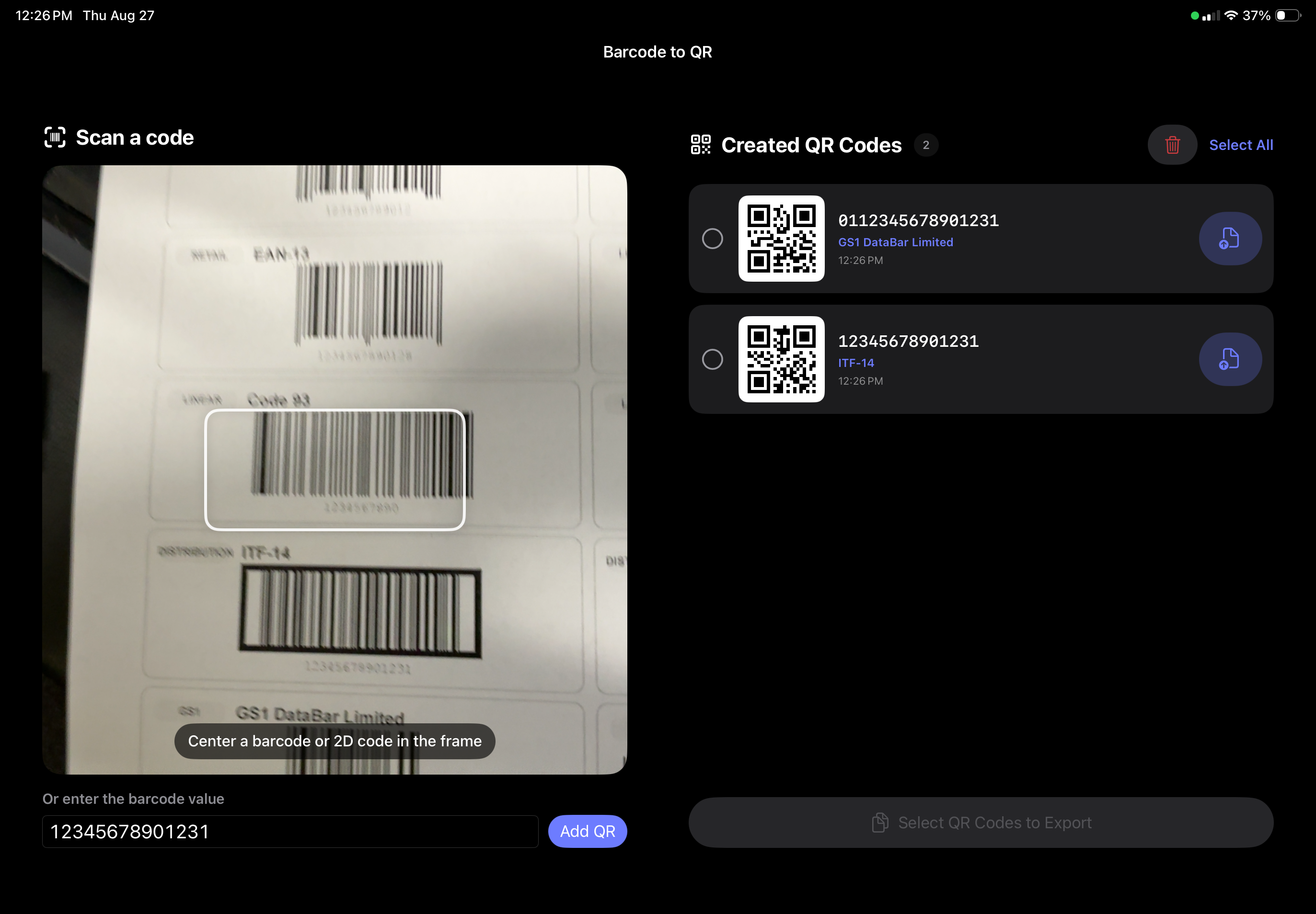
Scanner on the left, your growing list of QR codes on the right
In the app
Anyone can convert a single number. The work is in doing two hundred of them without losing track — so the app is built around the list, not the snapshot.
Centre a barcode in the frame and it reads instantly — no shutter button, no focus hunting, no app-switching to a separate scanner.
Linear, retail, distribution and GS1 symbologies — EAN-13, ITF-14, Code 93, GS1 DataBar and more. Each result is labelled with the format it came from, so you can tell a retail EAN from a carton ITF at a glance.
Every code you make lands in a timestamped list with its QR preview and source value. Scroll back, check your work, delete a mis-scan — nothing disappears the moment you look away.
Tick the ones you need — or Select All — and export the batch in one action. Export a single code straight from its row when that's all you're after.
Damaged label, code on a screen, a number read down the phone — type or paste the value and add it to the list exactly like a scanned one.
Scanning and encoding happen on-device. Your part numbers, SKUs and serials aren't uploaded to anyone's server — including ours.
Who it's for
Warehouse stock that needs checking from a phone. Asset tags nobody can read without the one handheld unit that's always missing. A product line where the barcode is on the carton but the customer has a camera. Inventory moved between systems that speak different formats.
A QR code carries the same identifier, but every phone on the floor can read it — and it can carry a link instead of a bare number, so scanning it opens the record rather than just reciting it.
Launch
Barcode to QR is in final review for iPhone and iPad. Leave us a note and we'll tell you the day it goes live — no list, no newsletter, just the one email.
Free browser version
No camera in this one — paste or scan a value with a handheld reader and it converts on the spot. Same encoder as the app, running entirely in this page. Nothing is uploaded.
Notes
A barcode is just a number or string drawn in bars. Both the app and this page take that value and re-encode it as a QR code, so the same identifier can be read by any phone camera instead of a dedicated scanner.
Add a URL prefix and a bare SKU becomes a QR that opens your product page, inventory record or manual. The barcode number stays the source of truth; the QR just makes it actionable.
PNG comes out at a generous resolution for labels; SVG is vector, so it stays crisp on anything from a 15 mm asset tag to a shop sign. Both include the quiet zone scanners need.
The encoder is our own implementation of ISO/IEC 18004 — Reed–Solomon error correction, all eight mask patterns, verified module-for-module against a reference implementation. No third-party service in the loop.
Handheld barcode scanners act as keyboards. Put the cursor in the field, scan, and the code regenerates and reselects itself — so you can work through a bin of stock without touching the mouse.
We build label pipelines, inventory tooling and scanning workflows as part of our application work. Tell us what you're moving and we'll scope it.